Loading jstats and its options automatically
As well as loading the package itself, the same setup file can carry the settings you want in place every time you work in this Project.
Once jstats is installed, you can have your Project load it for you every time it opens — so you never type library(jstats) by hand. It’s optional (typing the one line at the start of a session works perfectly well), but it takes only a couple of minutes to set up — and later on you can add other lines to the same file to handle other start-of-session tasks, like loading the data you’ll be working with. This uses a small setup file called an .Rprofile (a file R reads automatically when it starts).
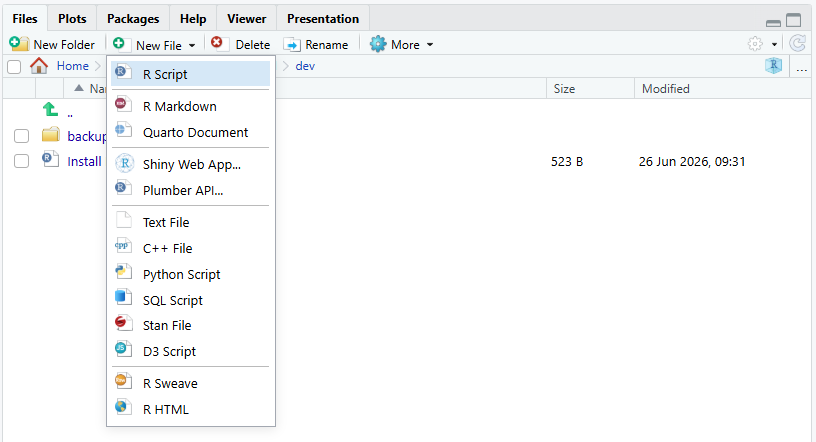
The file lives in your Project folder, and the easiest place to create it is the Files tab in the lower-right pane, which shows that folder’s contents. Click New File and choose Text File:
RStudio asks for the file name. Type .Rprofile — the leading dot included, nothing after it — and click OK:
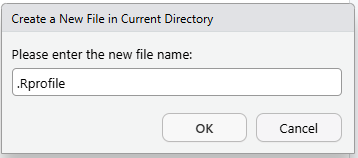
As long as you haven’t changed the save location, this puts your new .Rprofile in the right place — your Project folder, right next to the .Rproj file — and opens it in the Source pane. (There are other ways to create a text file, but this route is the most straightforward.)
If you chose R Script rather than Text File, RStudio adds a .R extension when the file saves — so a script saved under the name .Rprofile ends up on disk as .Rprofile.R, a name R never looks for, and nothing loads at startup. The fix is a rename: in the Files tab, check the box beside the file, click Rename, and remove the .R from the end. (Or check the box and click Delete, then start again with a Text File.)
Now copy and paste these lines into your new .Rprofile:
# To reinstall jstats (new computer, or after updating R) see the install
# code at: jma61.github.io/jstats-guides/install-jstats.html
library(jstats)

# Explained on the Declaring missing values page
joptions(missing.convention = "stata")

# Explained on the Loading, Saving, Converting Data page
joptions(data.dir = "Data")
Pasted in, the file looks like this:
.Rprofile×1# To reinstall jstats (new computer, or after updating R) see the install2# code at: jma61.github.io/jstats-guides/install-jstats.html3library(jstats)45# Explained on the Declaring missing values page6joptions(missing.convention = "stata")78# Explained on the Loading, Saving, Converting Data page9joptions(data.dir = "Data")
library(jstats) does the loading. The comment above it holds the address of the install page, so the reinstall instructions are one glance away on a new computer or after an R update.
The two joptions() lines below it are settings, and they work the same way as the load: anything you put in this file applies to every session you open in this Project, so you choose once instead of at the start of each session. Both are optional, and neither is explained here — each belongs to its own page. Telling jstats about missing values covers what a missing-value convention is and why Stata-style is the one jstats recommends; Loading, Saving, Converting Data covers the data folder. If you haven’t read those yet, leave the two lines out for now and add them later; the file works perfectly well with just the load.
Save — the disk icon at the top of the Source pane, or Ctrl+S (Cmd+S on a Mac) — and check that the tab reads .Rprofile, nothing more. (Picked up a .R on the end? The aside above has the fix.)
That’s it — now, every time you start a new RStudio session in this Project, jstats loads automatically. If you’d like to test it right away, restart R (Session menu, Restart R).
You’ll see it worked down in the Console: jstats announces itself with the same startup message you first met in jstats Quick Start — only this time you didn’t type anything to get it:
ConsoleTerminal×Background Jobs×jstats v0.9.267 is up to date.
For jstats conventions (useful to AI assistants too), run jai().
> |
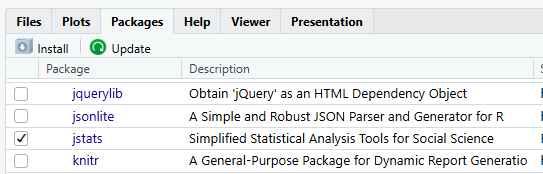
The Packages tab shows it too: the checkbox beside jstats is ticked — RStudio’s sign that the package is loaded for this session:
If you kept the two joptions() lines, each one also prints a short confirmation of its setting in the Console at every start, just below the startup message. And the first time the Project opens, jstats creates the Data folder and says so. If you would rather not see the confirmations, add quiet = TRUE inside the parentheses — joptions(data.dir = "Data", quiet = TRUE), for example.
Keep your .Rprofile to lightweight startup lines — loading a package, and later a setting or two. Do not put an install command (an install.packages("jstats", ...) line) in .Rprofile: because the file runs on every startup, an install line there tries to reinstall each time and can send RStudio into a loop. Installing is a one-off you run by hand; loading is the repeatable step that belongs in startup.
You can keep adding to the file as you settle on more preferences — how many digits to show in output is a common next one — but this is plenty to start.
This .Rprofile lives inside your Project and applies only to this Project. That’s deliberate — it’s self-contained and safe to edit. There’s also a global, all-Projects version, but it’s better left until you’re juggling several Projects at once; the books cover it.